 WakeNudge
The open-source alarm clock that actually gets you up.
WakeNudge is a free Android alarm clock that turns switching off an alarm into a wake-up mission: solve a math problem, scan a QR code across the room, tap an NFC tag, walk a few steps. Then a still-awake check makes sure you stayed up.
- Free
- Open source
- Offline
- No ads
For Android 8.0 or newer. How to install the APK.

From ringing to really awake in four steps
Pick a step to see the screen you would be looking at.
Try a wake-up mission
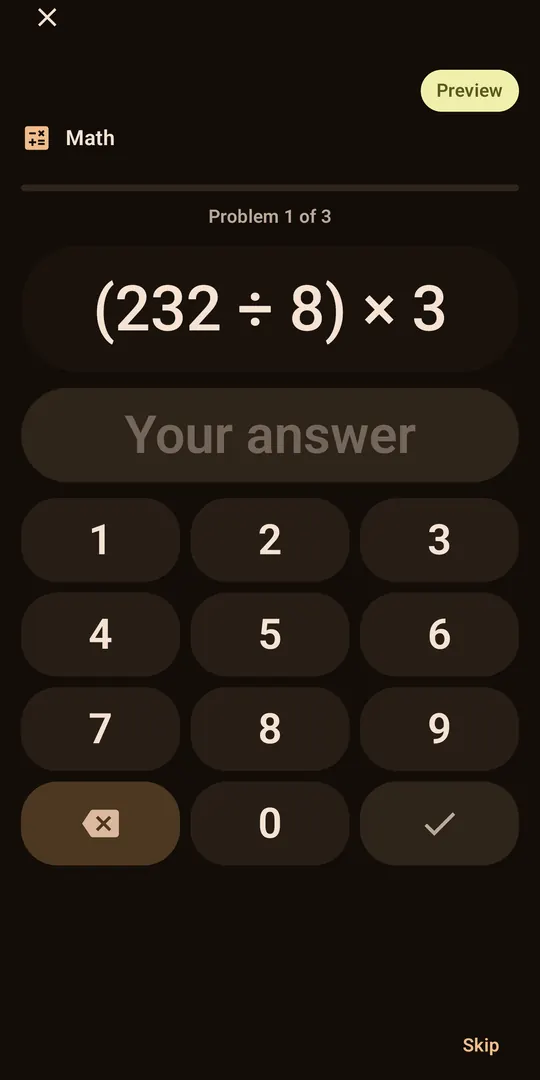
This is the math mission, running right here in your browser. Solve the sum on the keypad, or type the answer, to dismiss the alarm.
Nothing you type leaves this page. In the app you choose the difficulty and how many problems to solve.
The alarm is ringing. Solve it to dismiss.
See every screen
Real captures from the app. Swipe, use the arrow keys, or tap a phone.
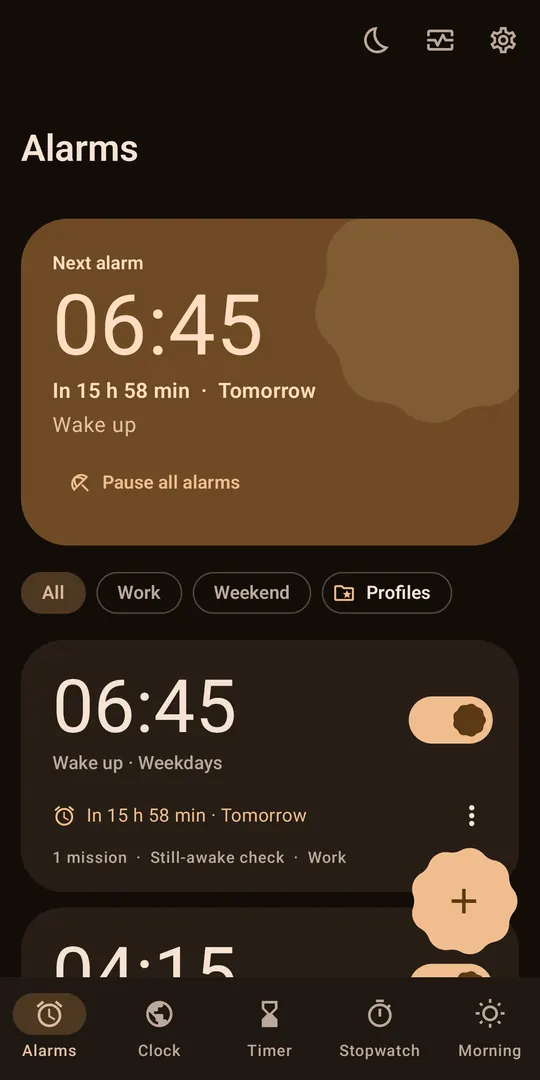
Your alarms Every alarm at a glance, the next one on top, with profiles to filter by. 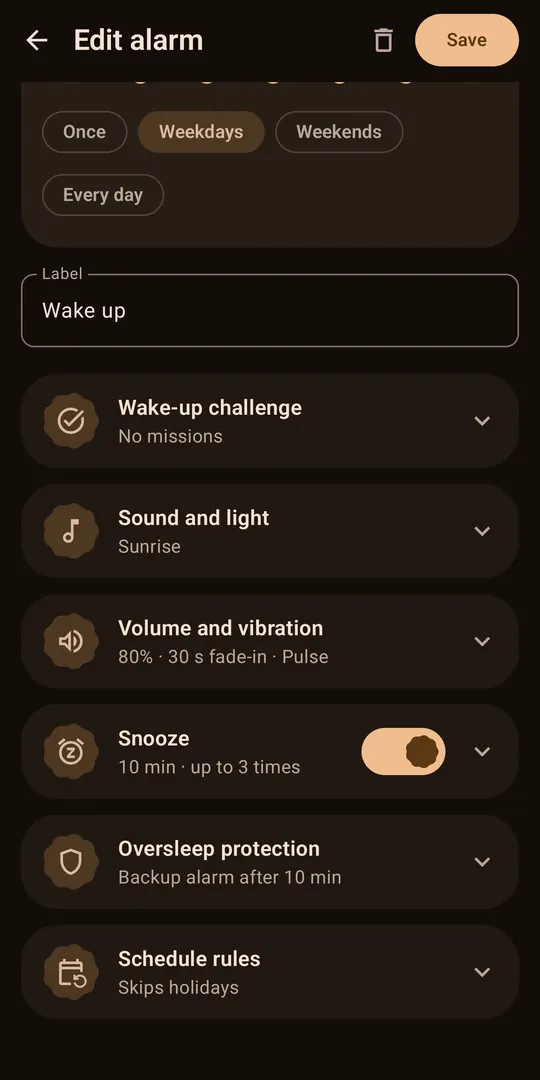
Set it up Pick the time and repeat days, then fine-tune how the alarm behaves. 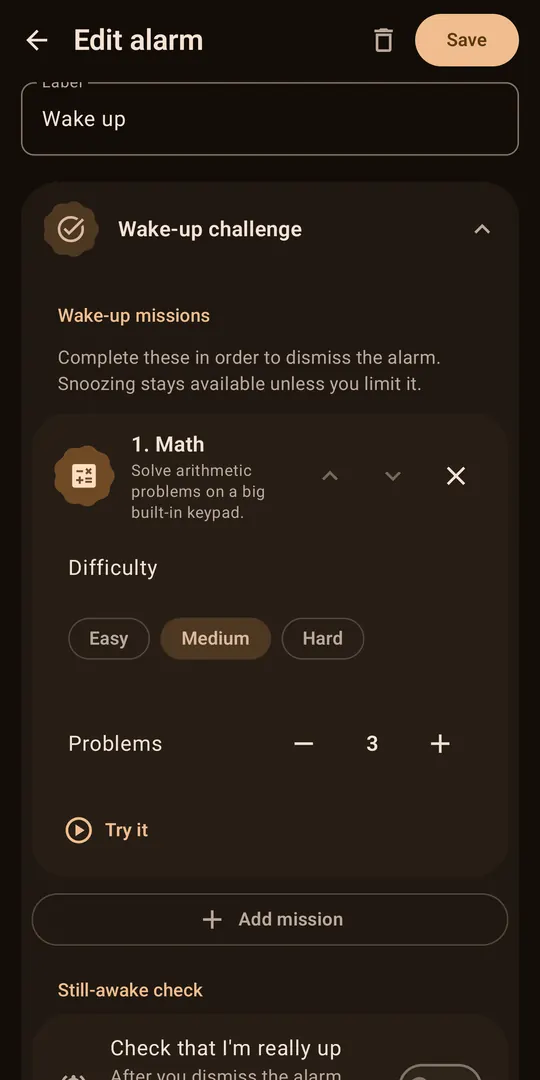
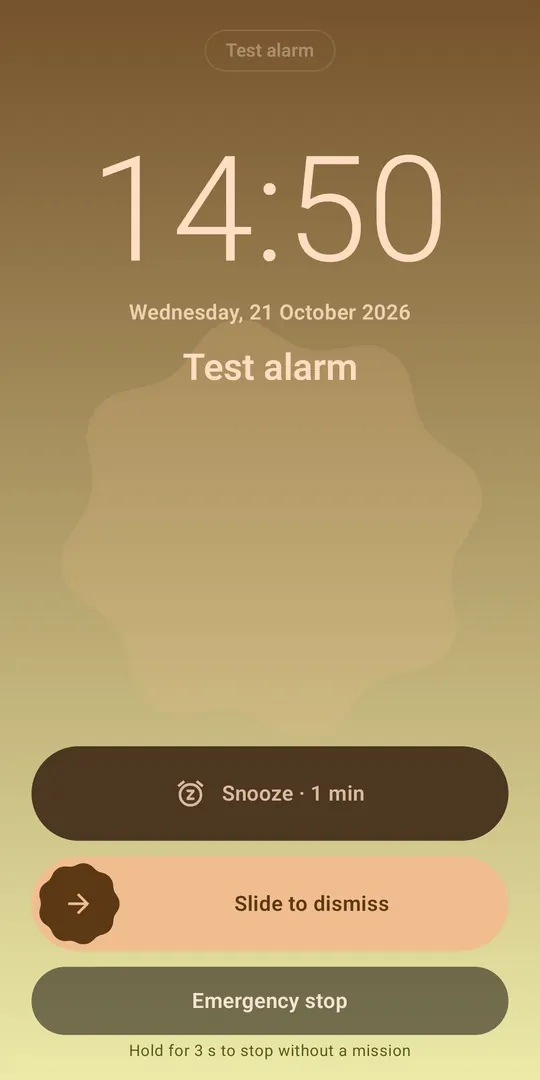
Choose your missions Add one or several missions, set the difficulty and how many, and try each first. Solve to dismiss The math mission on a big keypad. Memory, typing, scanning and moving work too. It rings over the lock screen Snooze, slide to dismiss, or hold the emergency stop. 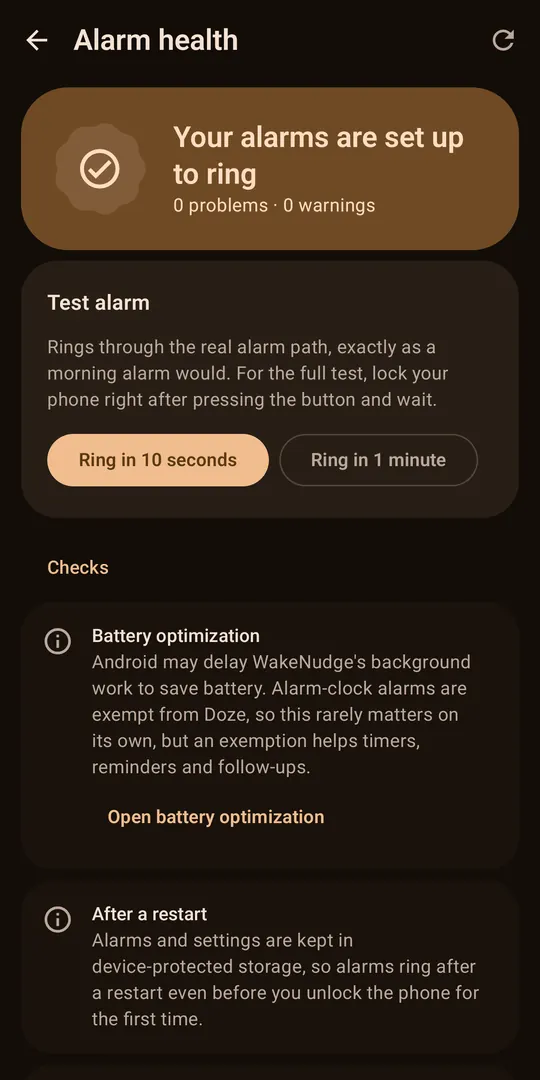
Alarm Health Checks what could stop an alarm on your phone and rings a real test alarm. 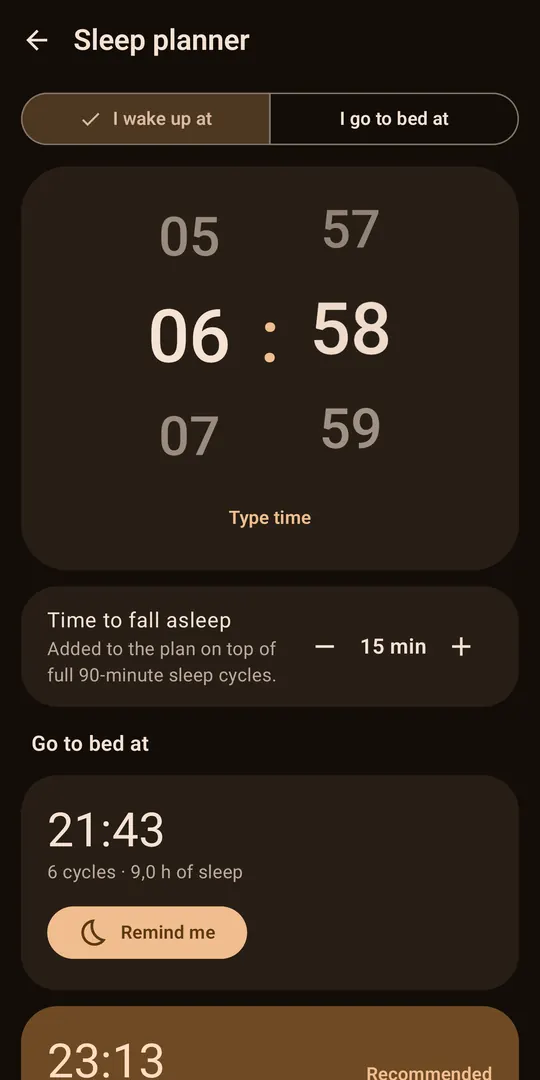
Sleep planner Plan bedtime or wake-up time around 90-minute sleep cycles. 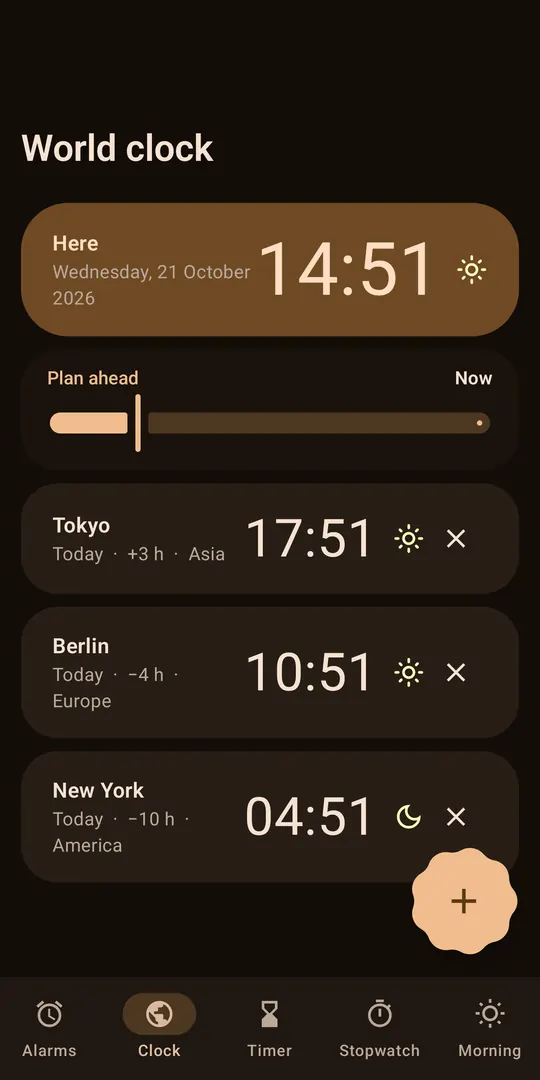
World clock Clocks for other time zones next to your own.
Ten ways to prove you are awake
Pick one or chain several, set the difficulty, and preview each before you rely on it. A mission your phone cannot do offers Continue instead of locking you in.
Math
Solve arithmetic on a big built-in keypad. Easy, medium or hard.
Memory
Watch tiles light up, then repeat the pattern as it grows.
Typing
Type a phrase exactly as shown.
QR code or barcode
Scan a code you stuck somewhere away from your bed.
Needs cameraNFC tag
Tap a tag you placed across the room.
Needs NFCShake
Shake the phone until the counter is full.
Needs motion sensorSteps
Walk a number of steps, counted on the phone.
Needs step counter or motion sensorSquats
Do squats while holding the phone against your chest.
Needs motion sensorPuzzle
Slide tiles into order, find the numbers, or trace a pattern.
Photo
Go to the place you photographed and point the camera at it.
Needs camera
Made to ring, honest about limits
Uses Android's alarm-clock API and the alarm audio stream, with a foreground service and a full-screen ring screen over the lock screen.
Re-arms itself after a reboot, an app update, a time-zone change or a daylight-saving jump.
Snoozes, backup rings and the still-awake check are saved, not just remembered, so they survive a restart.
Alarm Health checks notifications, exact alarms, battery restrictions, Do Not Disturb and audio, tells you how to fix each, and rings a real test alarm.
What no alarm app can do
A phone that is switched off will not ring, and some manufacturers restrict background apps aggressively. WakeNudge has been verified on one phone so far, a Pixel 6 Pro on Android 17. The testing notes list what was and was not tested. Run the test alarm on yours.
And the rest of a good alarm clock
Schedules that fit your week
Unlimited alarms, profiles like Work and Weekend, skip next ring, vacation mode, holiday and calendar exceptions.
Sleep planner
Work back from your wake-up time, or forward from bedtime, in 90-minute sleep cycles.
Clock tools
Timer, stopwatch with laps, world clock, three home-screen widgets and a Quick Settings tile.
Sounds that wake you
12 bundled tones or your own music, a volume ramp, vibration patterns, spoken announcements and a sunrise mode.
Backup and restore
Save your alarms as a file you choose and restore it on a new phone. Nothing is uploaded.
Material You design
Wallpaper colours, light, dark and AMOLED themes, large text, right-to-left and TalkBack support.
Your alarms never leave your phone
No accounts, ads or analytics
No sign-up, no ad networks, no crash reporting, no tracking SDKs.
Stored only on your phone
Alarms, history and settings live in the app’s private storage.
Permissions on demand
Camera, step counter and calendar are requested only when you use the feature that needs them.
The one network feature, and how to turn it off
The APK holds a single network permission, INTERNET, for an optional update notice. At most once a day it asks GitHub whether a newer release exists. The request carries no account, alarm data or device ID; like any web request, GitHub sees your IP address. Switch it off in About, then Updates.
Install the APK in four steps
Download it
Open the latest release on your phone and download the file named
WakeNudge-<version>.apk.Allow the install
Open the file. Android asks you to allow installing apps from this source (your browser or file manager). Allow it for this install. You can switch it off again afterwards in Settings, under “Install unknown apps”; the exact name varies by phone.
Check it, if you like
The release lists the APK’s SHA-256 in
SHA256SUMS.txt. Compute the SHA-256 of your download and make sure the two match.Try it
Open WakeNudge, follow the short onboarding, then open Alarm Health and ring the test alarm with your screen locked.
sha256sum -c SHA256SUMS.txt --ignore-missingUpdates. The APK tells you when a newer version is out, with a notice that checks at most once a day. Install the newer APK the same way. Turn the check off in About, then Updates.
Needs Android 8.0 (API 26) or newer.
Questions, answered
Is WakeNudge really free and open source?
Yes. It is released under the Apache License 2.0, with no ads, no subscription, no in-app purchases and no account. The full source code is on GitHub.
Is WakeNudge really offline?
The alarm clock itself never needs the internet. The APK holds only the INTERNET permission, used for an optional update notice that asks GitHub at most once a day whether a newer release exists. The request carries no account, alarm data or device ID; like any web request, GitHub sees your IP address. You can switch it off in About, then Updates.
How do I install the APK?
Download the .apk file from the latest GitHub release on your phone, open it, and allow installing from that source when Android asks. If you like, check its SHA-256 against SHA256SUMS.txt in the release first. It needs Android 8.0 or newer.
Will the alarm ring if my phone is switched off?
No app can ring a phone that is powered off. If the phone was off when an alarm was due, WakeNudge rings straight away on start-up if the alarm was due within the last 10 minutes. Otherwise it records the alarm as missed and shows a notification.
Does it work on Samsung, Xiaomi, OnePlus and other phones?
WakeNudge uses Android's standard alarm-clock APIs, but it has only been tested on a Pixel 6 Pro running Android 17. Some manufacturers add battery managers that can restrict background apps. Open Alarm Health in the app, follow its fixes, ring the test alarm with your screen locked, and report what happens on your phone.
I am a heavy sleeper. What should I turn on?
Use a mission that gets you out of bed, such as scanning a QR code or tapping an NFC tag placed away from the bed, or walking steps. Turn on the still-awake check, Extra Loud mode and the volume ramp, limit snoozes, and keep the backup alarm on. No app can guarantee a wake-up, so also run the test alarm once.
Can a mission trap me?
Not unless you ask it to. By default every restriction can be bypassed with the Emergency stop, a press-and-hold button on the ring screen. For a strict alarm you can switch the Emergency stop, and snooze, off per alarm. Even then, a mission that cannot be done on your phone, for example because there is no camera or permission was refused, offers a Continue button, and the alarm stops by itself after the ring timeout.
How do updates work?
The APK shows a notice when a newer version is out, and you install the newer APK yourself from the release page. You can turn the check off in About, then Updates.
Which Android versions are supported?
Android 8.0 (API 26) and newer. It has been verified on a physical device only on Android 17, so older versions are covered by tests but not yet by hardware.